Play Piano - Kids Music Games
- 4.6
- Rating
- 100.00K
- Installs
- Free
- Price

 Analysis by App-foxy
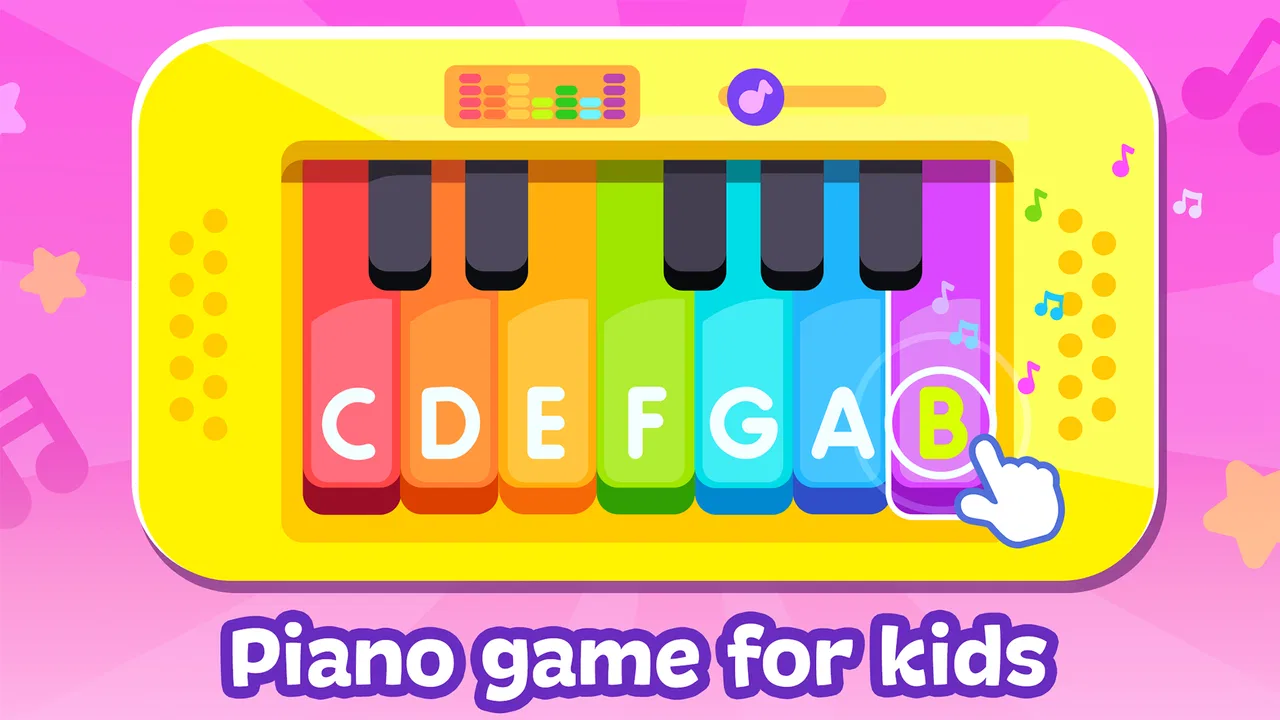
Play Piano - Kids Music Games is the kind of small music game I would open when I want a young child to explore sound without turning the phone into a complicated lesson. It is aimed at children from the youngest age group, carries an Everyone content rating, and comes from Amaya Kids - learning games for 3-5 years old. In my experience, its appeal is easy to understand: a child can tap into a playful musical activity built around a piano and other familiar instruments rather than having to read instructions or follow a formal course.
The important thing is to approach it as an introductory play space, not as a complete piano-teaching system. The game sits in the music category and is free to start, while optional purchases range from $1.99 to $9.99 per item. That combination makes it accessible for a quick trial, but parents should still look at the purchase screen before handing over the device. I found the strongest use case is a short, supervised activity for a preschooler who enjoys making sounds, copying rhythms, and switching between simple musical ideas.
How the musical play feels in everyday use
The central experience is deliberately direct. A child can interact with a baby piano, drums, guitar, and other instruments, so the game has more variety than a single virtual keyboard. That variety matters because preschool attention moves quickly. One minute a child may want to tap piano keys, and the next they may prefer the louder, more physical feeling of drums. Having several instrument styles in one place can keep the session from ending as soon as the novelty of the first screen wears off.
You May Also Like

 AccuWeather: Weather Radar
AccuWeather Review: A Quick, Clear Forecast for Everyday Decisions
For everyday plans, the best forecast is the one you can understand quickly. AccuWeather makes rain timing, radar, and local conditions easy to act on, with a few trade-offs.

 Hill Climb Racing
Why Hill Climb Racing Still Turns Crashes Into One More Run
A tiny car, a bumpy hill and one more upgrade: Hill Climb Racing keeps resurfacing because its simple chaos makes every near-miss feel personal.

 AliExpress - Shopping App
AliExpress Makes Global Shopping Feel Personal, but Shoppers Bear the Risk
AliExpress turns a global marketplace into a pocket-sized discovery engine. Its reach is useful, its shopping loop compelling, and its trade-offs easy to miss.

 Lords Mobile: Kingdom Wars
Lords Mobile Is a Kingdom-Building Routine, Not a Quick Match
A case-by-case verdict on the building, battles, device demands, and social commitments that make Lords Mobile rewarding for some players and exhausting for others.

 PDF Scanner app - TapScanner
TapScanner Makes Paperwork Easier to Capture, Check, and Share
TapScanner makes scanning with a phone feel less like a rescue operation and more like a dependable step in getting work done. Its capture tools are useful, though not flawless.

 Block Blast!
Block Blast! Shows How Much a Puzzle Game Can Leave Out
A quiet grid game shows why puzzle players increasingly value instant clarity, repeatable skill and low-pressure play—and where the genre still needs to catch up.
More From Our News Desk
View All News


I would introduce it during a calm moment rather than expecting it to occupy a child for a long stretch. For example, while waiting for an appointment or during a short break before dinner, I could let a child choose an instrument and experiment for a few minutes. The activity works best when an adult treats the sounds as a starting point for conversation: “Can you make a quiet beat?” or “Can you copy this rhythm?” That turns tapping into a small listening exercise without making the game feel like homework.
The best value here is open-ended musical discovery, not measured progress. I would not choose it for a parent who wants lessons, written notation, graded exercises, or a structured practice record. A dedicated beginner piano course is a better match for those goals. This game is more suitable when the objective is to make instruments feel familiar and inviting before a child is ready for formal instruction.
The short store description focuses on playing piano, but the broader experience is more useful when viewed as a collection of child-friendly instrument activities. The piano is likely to be the obvious first stop, while the drums and guitar provide a change of texture. That difference can help a child discover whether they prefer melody-like tapping or rhythm-making. It also gives siblings with different interests a reason to share the same app, although younger children may still need help taking turns.
Speed expectations on a supported device
The game is available for devices running Android 6.0 or later, so the compatibility range includes older hardware as well as newer phones and tablets. I would expect the basic interaction to feel immediate on a reasonably maintained device because this is a focused children’s music game rather than a large open-world title. Still, compatibility is not the same as identical performance everywhere. An older phone with limited free storage, many background apps, or a tired battery may feel less responsive than a newer tablet.
For a child’s game, perceived speed is less about loading a huge world and more about whether a tap produces a sound without an awkward pause. That is especially important with instruments: delayed audio can make a piano or drum activity feel broken even if the rest of the screen appears normal. Before a long car journey or a visit, I would open the game once, test several instruments, and make sure the device is behaving normally. This simple check is more useful than assuming that an older operating system guarantees a smooth experience.
I also recommend closing unrelated apps before giving the device to a child. That is not a special requirement of this title; it is a practical way to reduce interruptions on older hardware. If the device is shared with video calls, games, and photo apps, clearing recent tasks can leave more room for the music game and can reduce the chance that a child returns to another open screen by accident.
The game’s current version is 1.3.0, which gives parents a clear version reference when checking whether their installation is current. I would keep automatic updates under the adult’s control on a child’s device, then test the app after an update rather than discovering a change in the middle of a planned activity. That habit is particularly useful for a game used offline during travel or waiting-room visits, where troubleshooting is inconvenient.
What happens during heavier use
A brief session with one instrument should be a light task for most compatible devices, but heavier use can mean something different here than it does in a demanding action game. A child may move repeatedly between the piano, drums, guitar, and other instruments, tap rapidly, and keep the app open while the device is already handling background work. Those are the moments when responsiveness and audio consistency matter most.
I would pay attention to three practical signs: whether sounds remain aligned with taps, whether transitions between instruments stay comfortable, and whether the device becomes noticeably warm. I cannot treat every phone or tablet as equal, so these checks are more meaningful than a universal promise about speed. If the device has been streaming video for a long time, charging in a warm room, or running several apps, I would give it a short rest before starting a music session.
For a family tablet, a useful routine is to charge it ahead of time, disconnect unnecessary background activity, and launch the game before handing it over. This prevents a child from waiting through setup and makes the experience feel more reliable. It also lets the adult confirm that the right instrument screen is ready and that no purchase prompt is sitting where small fingers can reach it.
Rapid tapping is another reason to supervise at first. A preschooler may press everywhere simply to see what reacts, and that is part of the fun, but it can make it difficult to tell whether a sound was produced by the intended instrument or by a new screen. I would use the first session to show the child how to return to an instrument and how to pause when the device seems confused. That small lesson is more valuable than expecting the child to manage every transition independently.
Reliability and recovery when something goes wrong
Reliability for a children’s app includes more than avoiding crashes. It also means a child can recover from a wrong tap without losing interest, and an adult can restore the activity without a long explanation. The straightforward instrument concept helps here: if a child leaves the piano accidentally, I can guide them back to the musical screen rather than reconstructing a complicated level or account.
I would still prepare for ordinary mobile-app interruptions. A call, notification, low-battery warning, or accidental swipe can take the child away from the game. When that happens, reopening the app and checking the current screen is a sensible first step. If the audio does not respond as expected, I would close and relaunch it, then test one instrument before returning the device. This recovery routine is quick enough for everyday use and avoids blaming the child for a problem they cannot diagnose.
Parents should also decide who controls purchases. The game is free, but optional in-app items cost between $1.99 and $9.99 each. I would not leave a young child alone with an unrestricted payment setup, even if the child only intends to play music. A supervised device profile or an adult approval step is the safer arrangement. This is not a reason to avoid the game, but it is an important part of making a free-to-start children’s app comfortable for family use.
The Everyone rating makes it appropriate for a broad audience, yet age suitability is still personal. A child who enjoys tapping and sound may settle into it quickly; another may become frustrated if they expect a song to play automatically or want a more defined challenge. I would watch the first few sessions rather than assuming that the rating predicts attention span, patience, or independent use.
Device limits, storage habits, and family setup
The minimum operating-system requirement is Android 6.0, which is helpful for families using an older spare phone or tablet. The practical question is whether that device is still healthy enough for a child-focused activity. A phone can meet the operating-system requirement and still struggle because its storage is nearly full, its battery is weak, or its screen has unreliable touch input. Since musical play depends on accurate taps, a worn touchscreen can be more frustrating than the game itself.
I would choose a larger tablet when possible, especially for a child who is still developing fine motor control. A bigger display gives room for deliberate tapping and makes it easier for an adult to sit beside the child. A small phone is more portable, but it can encourage accidental touches and make instrument controls feel crowded. The better choice depends on whether the priority is travel convenience or comfortable shared play.
Resource demands also depend on how the device is being used. If the tablet is simultaneously downloading updates, playing audio elsewhere, or switching between several demanding apps, the music game may not receive the same attention from the device as it would during a clean session. I would avoid testing it for the first time when the child is already tired or impatient. A prepared device makes it easier to judge the game fairly.
Another useful habit is to create a consistent place for the app on the home screen. Children learn routines quickly, and keeping the game in one visible location can reduce wandering into unrelated apps. I would also use the device’s normal parental controls to limit purchases and notifications. Those controls are part of the phone or tablet rather than a special feature I would attribute to this game, but they make a real difference to the quality of a preschool activity.
Who will enjoy it, and who should choose something else?
I think this game is a good fit for families who want a gentle introduction to instruments, grandparents looking for a simple activity to share with a child, and parents who need a short, low-pressure distraction. It can also work well as a conversation starter about loud and soft sounds, fast and slow beats, or the difference between a piano and a drum. The variety of instruments gives adults several ways to adapt the activity to a child’s mood.
I would be more cautious about recommending it to an older child who already expects goals, unlocks, musical notation, or a clear sense of achievement. The same simplicity that helps a preschooler begin may feel shallow to a child seeking a real challenge. In that situation, a rhythm game with defined stages or a structured keyboard-learning app would probably offer more lasting engagement.
It is also not my first choice for unsupervised use on a shared family phone. The free entry point is convenient, but the presence of optional purchases means an adult should set boundaries first. Nor would I use it as a substitute for an acoustic instrument, a teacher, or regular music practice. Its role is closer to playful exploration: it can lower the barrier to touching a virtual instrument, but it cannot replace feedback from a person or the physical response of a real keyboard.
Compared with a standard piano simulator, this title has a broader preschool focus because it brings several instruments into the same child-oriented experience. Compared with a formal music-learning app, it is less demanding and easier to start, but also less suitable for building a planned curriculum. Compared with passive nursery videos, it asks the child to interact rather than simply watch. That is the trade-off I find most useful: it offers more participation than a video, while asking for less commitment than a lesson app.
My performance verdict after weighing the trade-offs
My overall impression is positive, with realistic expectations. Play Piano - Kids Music Games appears best suited to short sessions on a compatible, reasonably maintained device, where a child can explore piano, drums, guitar, and other instruments with an adult nearby. The game has reached over 100 thousand installs and holds a 4.6 average from around 230 ratings, which suggests that many families have found the basic idea appealing. Those figures are encouraging, but they do not remove the need to check how a particular device handles touch and sound.
I like that the entry point is free and that the age rating is Everyone, because it makes trying the activity straightforward. I also like the way the instrument variety can rescue a session when the piano alone no longer holds attention. My reservations are equally practical: optional purchases require parental control, older hardware should be tested before travel, and children looking for genuine musical progression will outgrow the experience.
If I were recommending it to a friend, I would say: install it on the tablet you already trust, open it before the child’s first session, and spend a few minutes exploring the instruments together. Keep the first activity short, ask the child to copy simple sounds, and watch how the device responds when tapping becomes fast. That approach reveals whether the game fits your family better than a quick glance at the store summary.
For preschool musical play, this is a pleasant starting point rather than a complete learning plan. The developer, Amaya Kids - learning games for 3-5 years old, has positioned it toward early exploration, and that focus is where it makes the most sense. I would choose it for curiosity, shared play, and a convenient way to make instruments feel approachable. I would skip it in favor of a structured music app when measurable lessons, advanced rhythm work, or dependable long-term progression matter more than easy experimentation.
FAQs for Play Piano - Kids Music Games
01What is Play Piano - Kids Music Games?
Play Piano - Kids Music Games is an interactive music app designed to introduce children to piano playing through colorful keys, simple melodies, and playful activities. It usually focuses on exploration rather than formal music lessons, allowing young users to tap notes, follow songs, and experiment with sounds in an entertaining, child-friendly environment.
02Is Play Piano - Kids Music Games suitable for young children?
The app is primarily aimed at children who are beginning to explore music, although the ideal age may depend on the child’s reading, coordination, and ability to follow on-screen instructions. Younger children may need help navigating menus or selecting songs. Parents should review the available content and settings to ensure the experience is appropriate.
03Does the app teach children how to play real piano songs?
Play Piano - Kids Music Games can help children become familiar with notes, rhythm, melodies, and basic keyboard interaction, but it should not necessarily be considered a complete piano course. Its activities are generally designed for entertainment and early musical discovery. Children who want structured technique, notation, or advanced lessons may need a dedicated learning app or teacher.
04Can Play Piano - Kids Music Games be used without an internet connection?
Offline availability may depend on the version of the app, the selected songs, and whether certain content must be downloaded first. Basic piano activities may work without a connection, while advertisements, updates, or additional features could require internet access. It is best to test the app after installation in airplane mode before relying on it during travel.
05Does Play Piano - Kids Music Games contain advertisements or in-app purchases?
Parents should check the app’s current store listing and settings because advertising and purchase options can vary between versions and devices. Some free children’s music apps include ads, locked song packs, or premium upgrades. Before handing over the device, review parental controls, disable unauthorized purchases, and confirm whether the available content meets your expectations.
Pros
- Simple touch controls make it easy for young children to start playing.
- Colorful visuals and playful sounds help keep kids engaged during practice.
- Includes familiar melodies that can encourage children to explore rhythm.
- Short activities suit quick play sessions without demanding long attention spans.
- Can provide screen-based musical entertainment without requiring extra instruments.
Cons
- Frequent repetition may feel limited for older children or advanced beginners.
- Some songs or features may be locked behind in-app purchases.
- Bright animations and sounds could be overstimulating for sensitive children.
- Gameplay offers limited value if your child wants structured music lessons.
- Ads or purchase prompts may interrupt play
- depending on the app version.

Play Piano - Kids Music Games
Gallery